Turn on Self-driving
Self-driving is Testmode’s agent for one project: it explores your app on its own, keeps a map of it, writes and fixes tests and investigates failed runs. Turn it on, choose where it works and how much, and tell it what matters.
Self-driving is the part of Testmode that tests your app without being asked. Once it is on, it explores the app a little every day, keeps a map of its screens and journeys, writes and fixes test cases, groups them in plans and schedules them, and investigates failed runs. What needs a decision from you arrives in the Inbox; everything it did is listed under Activity.
Turn it on
Section titled “Turn it on”You need the Editor role or above, and the project needs at least one environment.
-
Click the gear beside Self-driving in the sidebar. Self-driving settings opens.
-
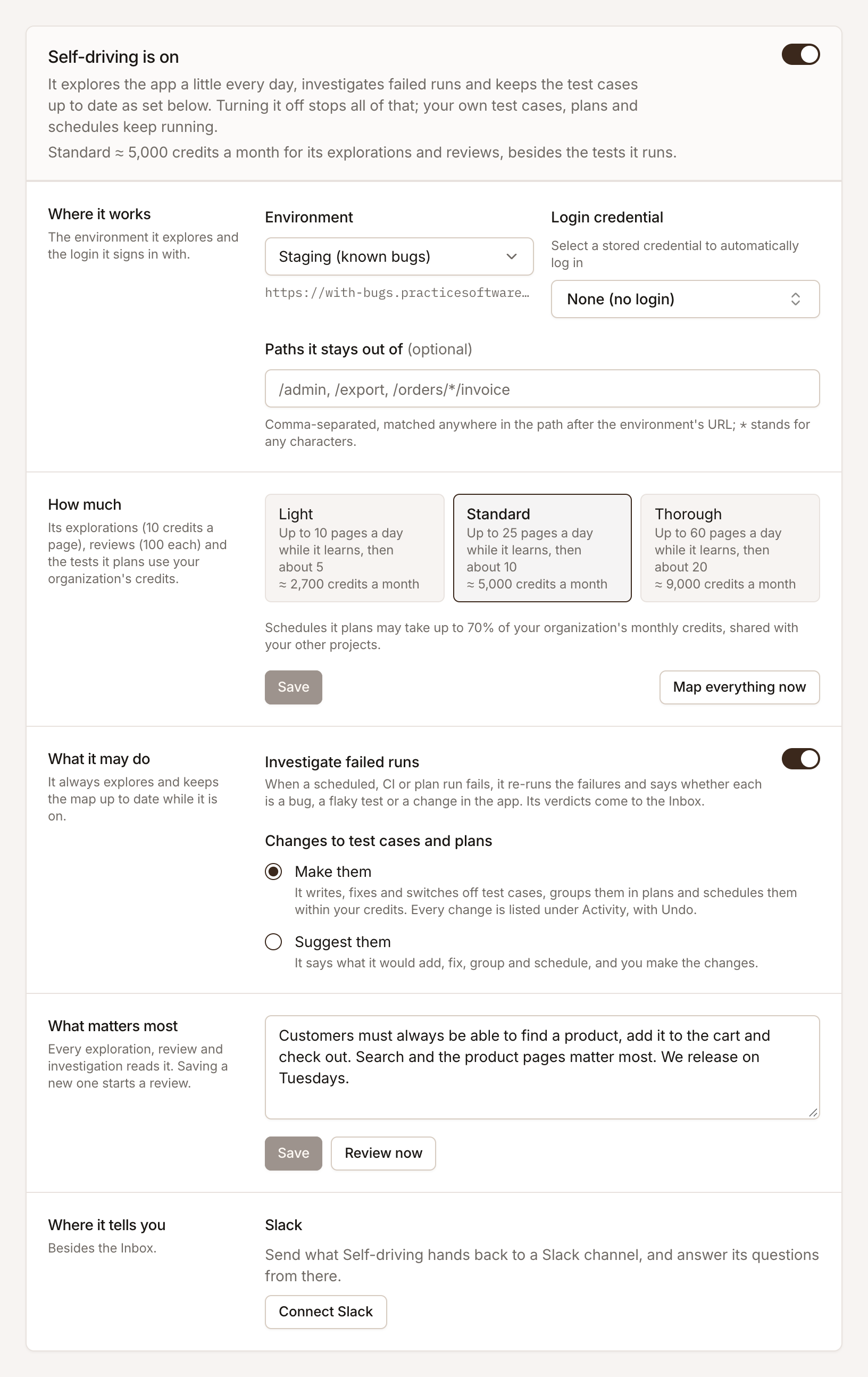
Under Where it works, choose the Environment it explores. It suggests a non-production one when the project has one: learn the app on staging and run the tests on production.
-
Optionally choose a Login credential. Self-driving signs in with it before it explores, so it can reach the screens behind your login. Without one it stays signed out.
-
Under How much, choose Light, Standard or Thorough (see below), and click Save.
-
Turn on the switch at the top of the page.
Its first exploration starts at once. The sidebar shows what Self-driving is doing beside its name: Exploring, Analysing, On, Off or Paused.
Tell it what matters most
Section titled “Tell it what matters most”Under What matters most, write the project’s goal in your own words, and click Save. Every exploration, review and investigation reads it. For example:
Customers must always be able to find a product, add it to the cart and check out.Search and the product pages matter most. We release on Tuesdays.Saving a new goal starts a review, unless one ran recently (see below). Review now starts one straight away, whenever you click it.
How much it does
Section titled “How much it does”Each level sets how many pages Self-driving explores a day and how often it reviews the project. The credits are for its explorations and reviews; the tests it plans and runs use credits like any other test.
| Level | Pages a day while it learns | Pages a day after | Credits a month, about |
|---|---|---|---|
| Light | Up to 10 | About 5 | 2,700 |
| Standard | Up to 25 | About 10 | 5,000 |
| Thorough | Up to 60 | About 20 | 9,000 |
- Learning your app. At first it explores up to the day’s pages, starting from the screens it has seen a link to but not read yet. When none are left, or after a week, it moves on.
- Keeping up with your app. Then it explores once a day: screens that changed, new links, the first screens of important journeys and the screens it has not seen for longest.
- Map everything now lifts the day’s limit: one exploration after another until it has read every screen it found a link to, for a day at most. Stop mapping returns it to its daily pace.
Schedules Self-driving plans may use up to 70% of your organization’s monthly credits, shared by all your projects, so your own runs and CI always have room. See How credits are counted.
What it may do
Section titled “What it may do”Under What it may do:
- Investigate failed runs. On by default. When a scheduled, CI or plan run fails, Self-driving re-runs the failures and files a verdict in the Inbox. See Investigate failed runs.
- Changes to test cases and plans. Make them (the default): it writes, fixes and switches off test cases, groups them in plans and schedules them, and lists every change under Activity with Undo. Suggest them: it says what it would change, and you make the changes.
It always explores and keeps the map up to date while it is on.
When it reviews the project
Section titled “When it reviews the project”A review reads the goal, the map, the test suite and what happened lately, and then acts on it. One starts:
- when you save a new goal, or click Review now;
- when an exploration finishes;
- when your pipeline reports a deploy (see REST API);
- when Testmode notices the app changed: every few hours it compares the key screens with how they looked, and reviews when they differ;
- once a week, on Monday at 06:00 UTC, for projects with a goal.
Reviews are spaced out by level: at most one every 60 hours on Light, 36 on Standard and 24 on Thorough, so each level has a known cost. Review now is never held back. See How Self-driving works for what a review does.
Turn it off or pause it
Section titled “Turn it off or pause it”- Turn it off with the switch on the settings page. It explores, reviews and investigates nothing until you turn it on again; an exploration already going finishes. What it learned stays on the map, and your own test cases, plans and schedules keep running.
- Pause testing in the project’s Settings stops everything that runs on its own at once: schedules, CI runs and Self-driving. See Pause testing and protect data.