How Self-driving investigates failed runs
When a scheduled, CI or plan run fails, Self-driving re-runs each failed test, reads its evidence and files a verdict: bug, intended change, test problem, environment or flaky. For an outdated test it writes new steps and tries them first.
When a run fails, Self-driving works out why, so nobody has to open a red run and dig through it. It looks at every failed test, re-runs it in a fresh browser, and files a verdict in the Inbox. For a test that is out of date, it also writes new steps, tries them, and offers them for you to apply in one click.
When it investigates
Section titled “When it investigates”Self-driving investigates a run that ends Failed when the run was started:
- by a schedule;
- by CI or the API;
- for a test plan.
A single test started by hand is left alone: that is usually a test still being written. Each run is investigated once.
Tests that failed on Testmode’s side, such as an AI model or browser outage, are left out: they are not your app’s problem, and they are not charged. A login that failed or a start page that didn’t load is your environment’s problem, and is investigated.
It needs Self-driving to be on, with Investigate failed runs switched on in its settings (the default). See Turn on Self-driving.
What it does
Section titled “What it does”For each failed test, Self-driving:
- reads the test as written and every operation it ran, with the browser’s console errors and failed network requests;
- looks at the screenshot taken the moment the test failed;
- checks the test’s history: when it last passed, how often its result changes, and whether it was edited since;
- re-runs the test in a fresh browser, on the same environment and login. A re-run is a run of its own, named Re-run: …. An investigation re-runs at most 5 tests.
Then it files one verdict per test:
| Verdict | Meaning | In the Inbox |
|---|---|---|
| Bug | The app does something wrong. | Needs you |
| Intended change | The app changed on purpose and the test still expects the old behaviour. | Ready to review when a fix passed, otherwise needs you |
| Test problem | The test is wrong or too vague to pass reliably. | Ready to review when a fix passed, otherwise needs you |
| Environment | The login, the site or the test data is not usable. One item covers every test that failed for that reason. | Needs you |
| Flaky | It passed when re-run. | Kept under Done; it needs you from its third time |
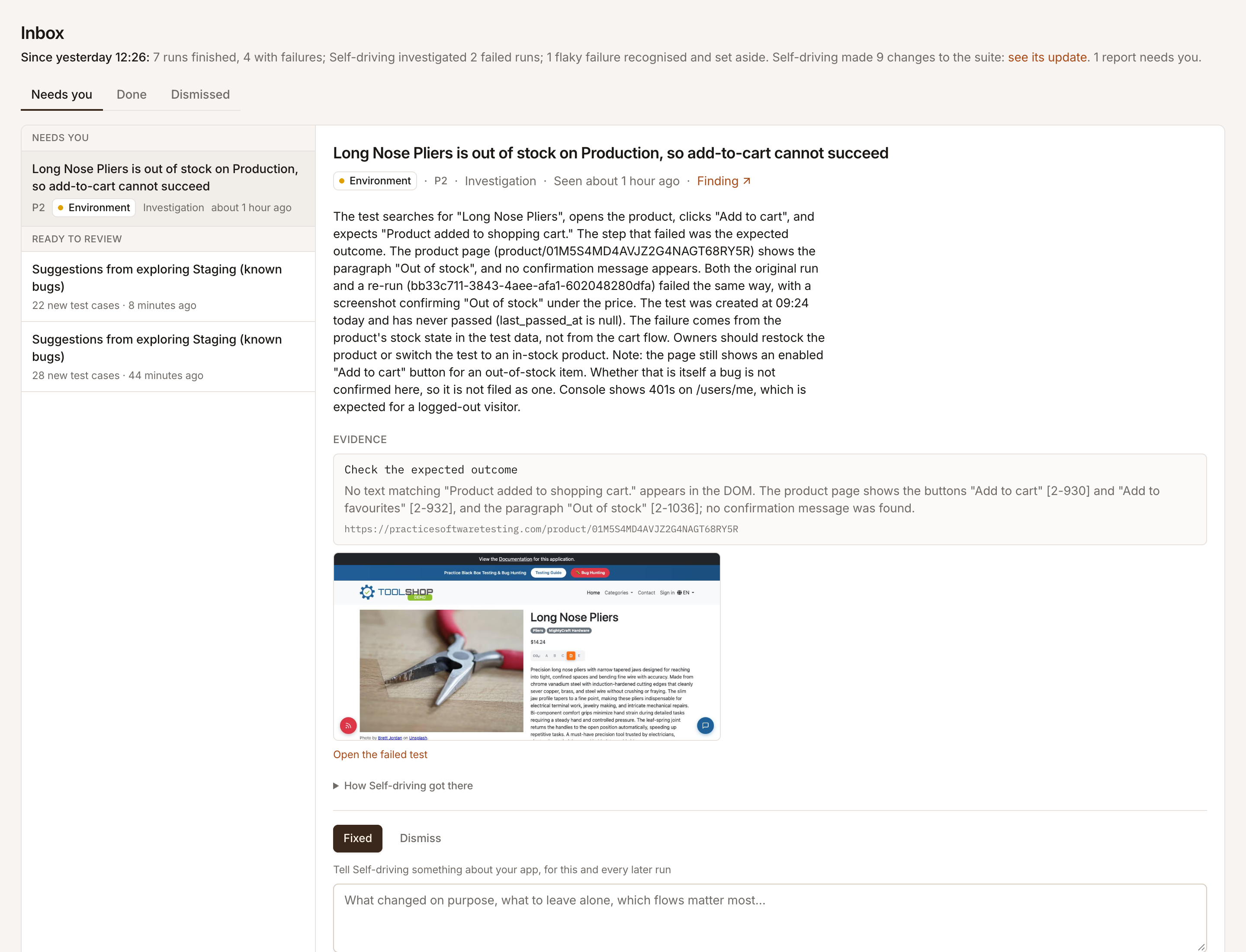
It is built to be precise rather than to report everything. A verdict needs a re-run that agrees with it: a flaky verdict needs a re-run that passed, any other verdict one that failed. After a re-run that passed it may re-run once more, since a check can misread a page. A failure it can’t explain from evidence is left unreported.
Fixes it has already tried
Section titled “Fixes it has already tried”For an intended change or a test problem, Self-driving writes the test’s steps as they should read and runs them as a draft: a run named Draft: … that uses the new steps without changing your test. It keeps what the test checks and changes how it gets there, unless the check itself is wrong. An investigation tries at most 3 drafts.
When a draft passes, the Inbox item is ready to review. It shows the new steps under New steps, tried and passing, links to the draft run, and offers Apply to test. When no draft passed, the item needs you and may show Suggested steps that were not run.
Where you see it
Section titled “Where you see it”- The Inbox lists each verdict that needs someone. See Work through the Inbox.
- Runs says under a failed run whether Self-driving is still investigating it, and what its failures turned out to be.
- Activity lists every investigation, with Open run and, while one is working, Stop.
- Findings records each failure with the verdict as its triage. See Findings.
Teach it about your app
Section titled “Teach it about your app”Under any Inbox item, Tell Self-driving something about your app saves a note that every later investigation reads. Say once what it keeps getting wrong: “the cookie banner only shows in the EU”, “the demo starts empty on every load”.
Turn it off
Section titled “Turn it off”In Self-driving settings, switch off Investigate failed runs. Failed runs are then left for you; their failures still file findings for you to triage.
Common questions
Section titled “Common questions”Does Self-driving investigate a test I started by hand?
Section titled “Does Self-driving investigate a test I started by hand?”No. A single test started by hand is usually a test still being written, so it is left alone. Runs started by a schedule, by CI or the API, or for a test plan are investigated.
Do re-runs and drafts cost credits?
Section titled “Do re-runs and drafts cost credits?”Yes. An investigation costs 50 credits when it completes, and its re-runs and draft runs pay for the actions they run, like any test.
Can it change my test without asking?
Section titled “Can it change my test without asking?”Not from an investigation. It runs new steps as a draft that leaves your test as it is, and offers them in the Inbox. They replace your steps only when someone clicks Apply to test.