Track what testing found
Findings is one ledger of what testing found in your app: every test that fails for a reason of the app files a finding with its evidence. Triage each one as a bug, intended change, test problem, flaky or environment, and follow a bug until a passing run verifies the fix.
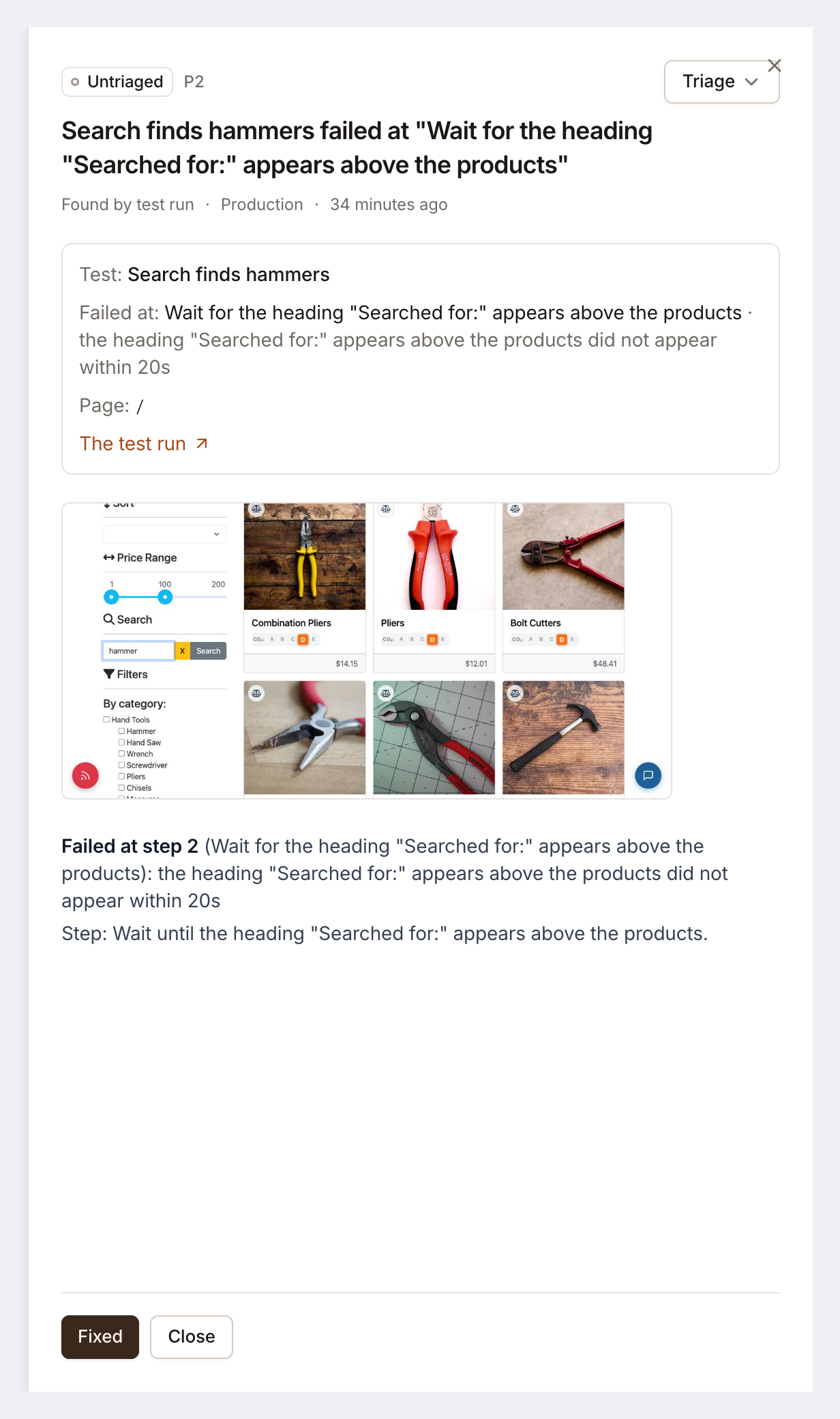
Findings is the ledger of what testing found in your app, whoever found it. Each finding is one fact, such as “Checkout total ignores the discount code”, with the test, the step it failed at, the page and the screenshot. Its triage says what it turned out to be, and its state says whether it is still open.
Open it with Findings in the sidebar, or press G then F. The number beside it is what still needs someone: open bugs and failures nobody has triaged.
Where findings come from
Section titled “Where findings come from”- Failed tests. Every test that fails for a reason of your app files a finding the moment it finishes. A failure on Testmode’s side, such as an AI model or browser outage, files nothing. A failed login or a start page that didn’t load is filed once per environment, already triaged as an Environment problem.
- You. New finding files a bug you saw yourself: What is wrong, the Environment, a Priority from P0 · urgent to P3 · low, and optional Notes.
The same failure never files a second finding while the first is open or fixed: the same test failing at the same step counts as another occurrence of it (Seen 3 times).
Triage
Section titled “Triage”A finding’s triage is one of five answers:
| Triage | Meaning | What happens |
|---|---|---|
| Bug | The app does something wrong. | Stays open until it is fixed |
| Intended change | The app changed on purpose; the test still expects the old behaviour. | Closed |
| Test problem | The test is wrong or too vague. | Closed |
| Flaky | It passes when run again. | Closed |
| Environment | The login, the site or the test data is not usable. | Stays open until a run on that environment passes |
With Self-driving on, its investigation of a failed run triages the finding, and the finding links to the Inbox item. Otherwise, or to change its answer, click Triage (or Change triage) on the finding, on the Findings list or under the failed test on its run page, and pick what it is. You need the Editor role or above.
A bug’s life
Section titled “A bug’s life”- Open: the test failed, and the finding is triaged as a bug, or not triaged yet (Untriaged).
- Fixed, verifying: someone clicked Fixed, here or on its Inbox item.
- Verified fixed: the test’s next passing run confirms the fix. If the test fails at the same step before that, the finding opens again.
Close closes a finding without a fix; Reopen opens a closed one.
Read the list
Section titled “Read the list”The tabs are Needs attention (open bugs and untriaged findings), Open and Closed. Filter by triage and by environment. Above the list, a line counts open bugs, untriaged findings, fixes being verified and fixes verified this month.
Each row shows the triage, the finding, where it happened, who found it (Test run or By hand) and when it was last seen. Click a row for the details: who triaged it, when it was first and last seen, the test, the step it failed at, the page, a link to the latest test run, the screenshot and its Inbox items.
On a run page
Section titled “On a run page”Under a failed test, a line shows its finding: Nobody has looked at this failure yet, its triage and who gave it, or whether it is fixed. Finding opens it, and Triage answers it without leaving the run.
Common questions
Section titled “Common questions”Does every failed test file a finding?
Section titled “Does every failed test file a finding?”Every test that fails for a reason of your app does. A failure on Testmode’s side, such as an AI model or browser outage, files nothing. A failed login or a start page that didn’t load is filed once per environment, as an environment problem.
Do I need Self-driving to use Findings?
Section titled “Do I need Self-driving to use Findings?”No. Findings are filed on every plan. With Self-driving on, its investigations triage them for you; without it, you triage them yourself in one click.