Plans and billing
Testmode’s plans, the 14-day Pro trial, and how Owners and Admins choose, change or cancel the plan, read usage and history, and download invoices.
An organization runs tests on a plan. Each plan includes a number of test runs a month: running one test case uses one test run, however many steps it has. Members are free and unlimited, and so are projects and explorations.
The plans
Section titled “The plans”| Plan | Price | Test runs | Good for |
|---|---|---|---|
| Pro trial | Free for 14 days, card required | 250 for the trial | Trying Pro on your own app |
| Pro | $59 a month | 500 a month | Teams making testing part of their everyday workflow |
| Startup | $199 a month | 2,000 a month | Growing teams with larger suites or frequent schedules |
| Enterprise | Custom | Agreed with you | SSO, audit log, on-premises applications |
Prices are in US dollars. Current prices and what each plan includes are on the Pricing page and on the plan cards in the app, which come straight from our payment provider. An organization without a plan can’t run tests, start explorations or use the Assistant.
The Pro trial
Section titled “The Pro trial”- Start it from the plan step at the end of setup, from the Billing tab, or by following a Try for free link on testmode.ai.
- It asks for a card and charges nothing for 14 days. When the trial ends, Pro’s first month is charged and its 500 test runs are added.
- Cancel before the end and nothing is ever charged. The trial keeps working until its last day.
- Start Pro now on the Billing tab ends the trial early and charges the first month, for example when the trial’s test runs are used up.
- One trial per organization. An organization that has had its trial is offered the plans to buy.
Who can manage billing
Section titled “Who can manage billing”Every member sees the plan and the test runs left at the bottom of the sidebar, for example “Pro · 493 test runs left”. It turns amber when few are left. Only Owners and Admins can open the Billing tab, choose or change the plan, cancel, and open invoices.
The Billing tab
Section titled “The Billing tab”Open the organization menu at the bottom of the sidebar and click Plan & billing, or go to Organization Settings > Billing.
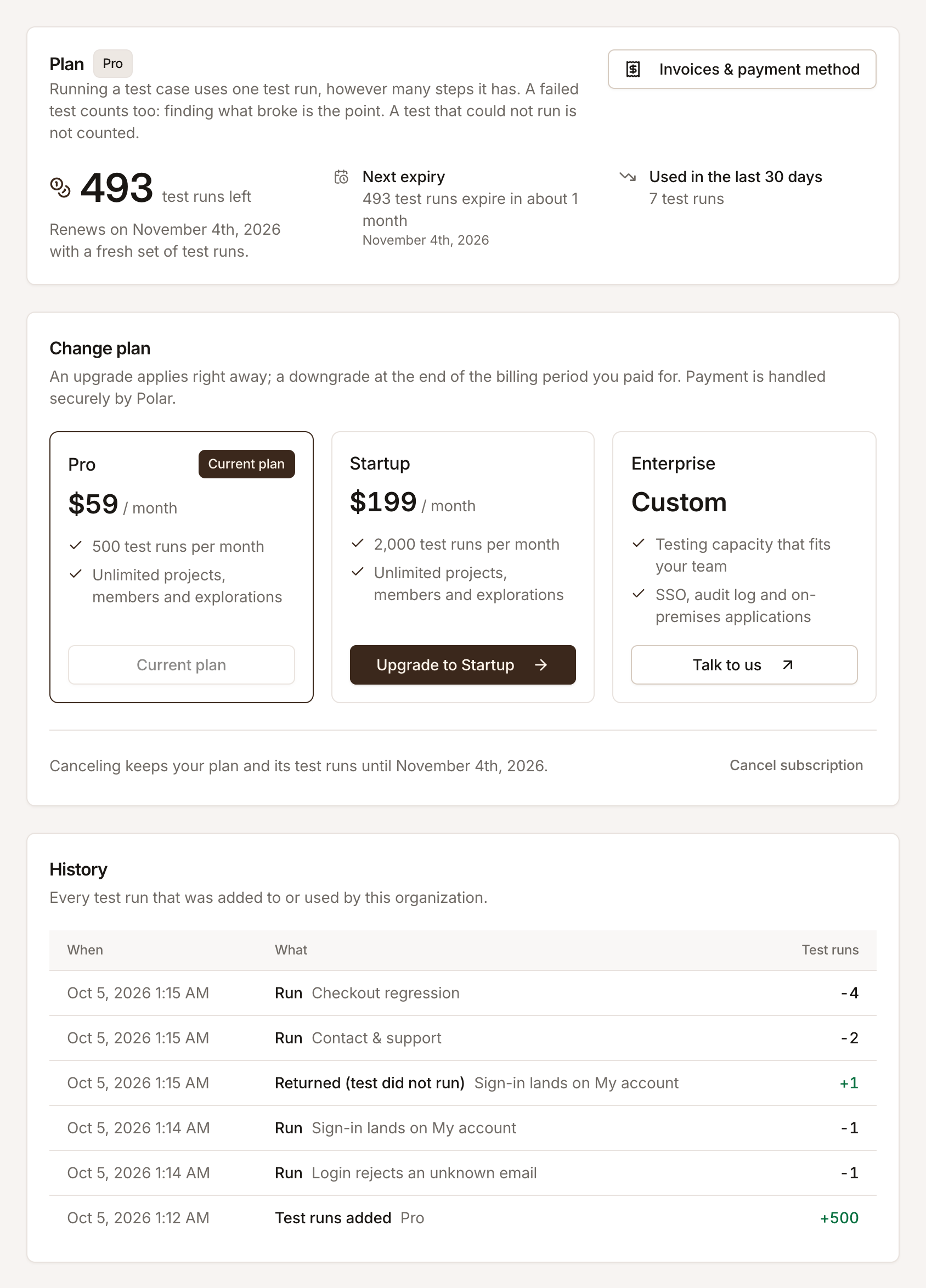
It shows:
- Plan and test runs left, with the date the plan renews with a fresh set of test runs.
- Next expiry: how many test runs expire and when. Unused test runs don’t roll over to the next month.
- Used in the last 30 days.
- Change plan: the plan cards, with your current plan marked.
- History: every test run added to or used by the organization, newest first. A run shows as “Run” with the number of test runs it used; a test that couldn’t run shows “Returned (test did not run)” when it was given back.
- Invoices & payment method: opens the customer portal of Polar, our payment provider, for invoices, receipts and the card on file.
Choose or change the plan
Section titled “Choose or change the plan”-
On the Billing tab, find the plan you want under Change plan.
-
Click its button, for example Upgrade to Startup. A dialog says what the change costs and when it applies.
-
Confirm.
- Upgrades apply right away. You’re charged the prorated difference for the rest of the period, and the extra test runs, prorated the same way, are added at once.
- Downgrades apply at the end of the period you paid for, so you keep the higher plan until then. The Billing tab shows the scheduled change, and you can keep your current plan instead.
- A declined card leaves the plan as it was, and the tab says so.
An organization with no plan sees the same cards, with Start 14-day free trial on Pro if it hasn’t had a trial yet. Choosing a plan opens Polar’s checkout.
Cancel
Section titled “Cancel”Click Cancel subscription at the bottom of Change plan. The plan and its test runs stay until the end of the period you paid for, and nothing more is charged. Until then, you can resume the subscription from the same tab.
Enterprise
Section titled “Enterprise”Enterprise plans are set up with you directly. Their Billing tab shows the plan and its test runs, with a link to talk to us instead of the plan cards. Book a call to discuss one.
Related
Section titled “Related” testmode
Better software quality. No manual testing. Your team knows the software. Testmode does the testing.