Work through the Inbox
The Inbox holds what Self-driving needs from you: its questions, its verdicts on failed runs and the suggestions of explorations. How to read an item, answer it, apply a fix, confirm a bug or dismiss it.
The Inbox is where Self-driving hands things back to you. Everything in it waits for a decision: a question only your team can answer, a verdict on a failed run, a fix it has already tried, or an exploration’s suggestions. What Self-driving did without needing you is not here; it is under Activity.
Open it with Inbox in the sidebar’s Self-driving section, or press G then I. The number beside it is how many items wait.
What arrives
Section titled “What arrives”| Item | From | What you do |
|---|---|---|
| Question | A review that needs something only your team knows | Answer it, or skip it |
| Bug | An investigation: the app does something wrong | Confirm it, or mark it fixed |
| Intended change | An investigation: the app changed on purpose, the test still expects the old behaviour | Apply the new steps, or update the test yourself |
| Test problem | An investigation: the test is wrong or too vague to pass reliably | Apply the new steps, or update the test yourself |
| Environment | An investigation: the login, the site or the test data is not usable | Fix the environment, then mark it fixed |
| Flaky | An investigation: the test passed when re-run | Usually nothing: it is set aside until it happens a third time |
| Exploration | An exploration with suggestions not added or declined yet | Review the suggestions |
See Investigate failed runs for how each verdict is reached.
The list is grouped into Needs you (decisions) and Ready to review (a fix that already passed, or an exploration’s suggestions), most urgent first. Each item has a priority from P0 (urgent) to P3 (low).
The brief
Section titled “The brief”Above the list, a line says what happened since your last visit in this browser: how many runs finished and how many failed, how many failed runs Self-driving investigated, flaky failures it set aside, and how many changes it made to the suite, with a link to its update.
Read an item
Section titled “Read an item”Click an item to open it beside the list. J and K move through the list.
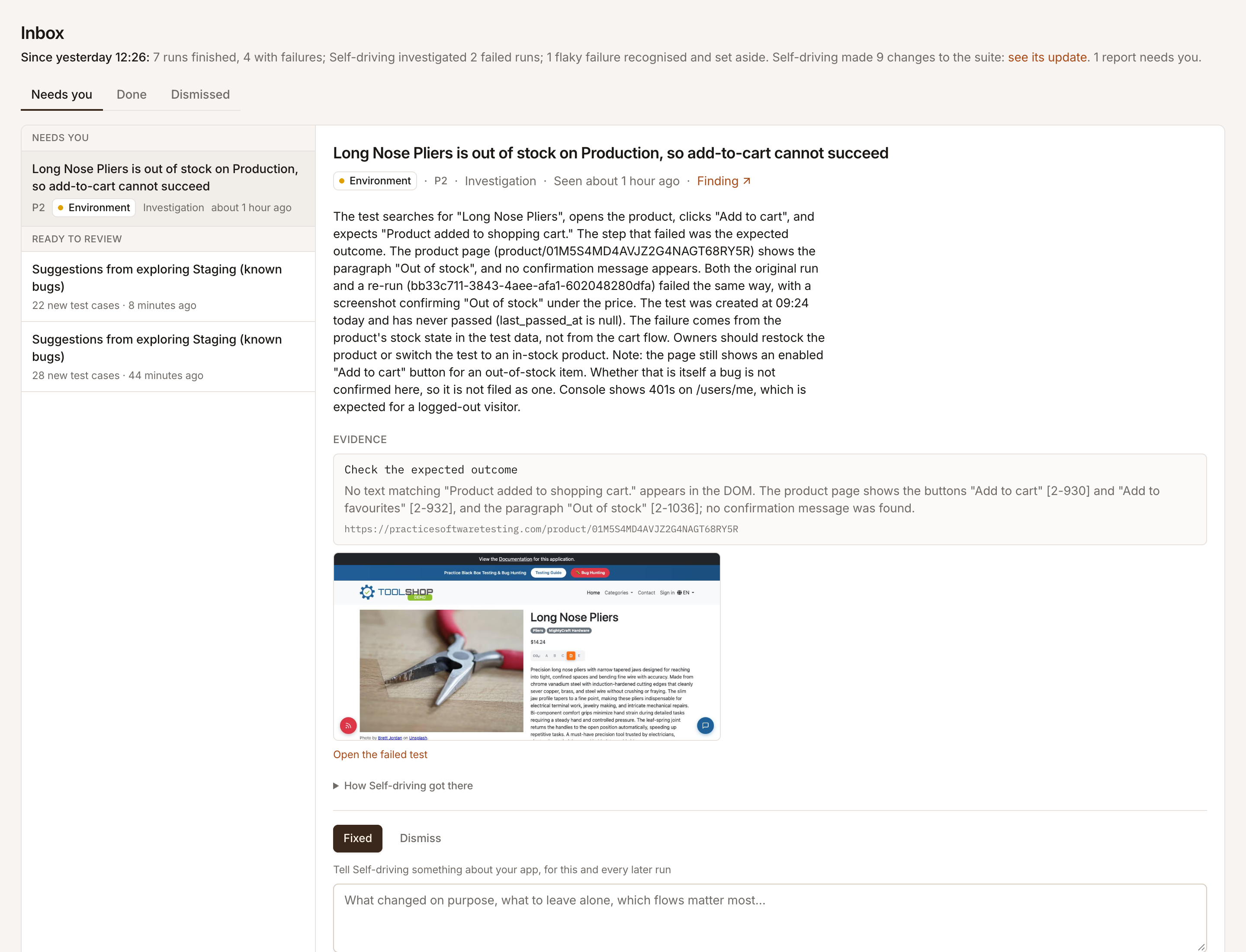
An investigation’s verdict shows:
- The title: the verdict in a sentence, with its kind, priority and when it was seen. Seen N times means the same failure came back.
- The summary: what Self-driving found and why it thinks so.
- Evidence: the operation that failed and the page it ran on, the screenshot taken at that moment, a link to Open the failed test, and what the re-run did, for example Re-run failed the same way.
- New steps, tried and passing, when it rewrote the test and a draft run with the new steps passed. The link opens that draft run.
- Suggested steps, when it has steps it could not get to pass, marked Not run yet; or, for a bug, What the app should do.
- How Self-driving got there: each step it took, such as Re-ran the test in a fresh browser.
- Finding: a link to the finding the failure filed.
Act on it
Section titled “Act on it”You need the Editor role or above. Viewers read the Inbox.
- Apply to test (a ready item): the tried steps replace the test case’s steps, and the item is done. It is refused when someone changed the test case after Self-driving read it: the steps were tried against the older version, so open the test case and change it by hand.
- Confirm bug: you know about it. It moves to Done, and when the same failure comes back it is counted, not reported again.
- Fixed: it moves to Done, and comes back if the failure does.
- Open test case: opens the test in its editor.
- Dismiss: not worth acting on. It stays dismissed if it happens again.
- Reopen, from the Done or Dismissed tab.
Under every item, Tell Self-driving something about your app saves a note that every later run reads: what changed on purpose, what to leave alone, which flows matter most. Click Save as note. Notes are listed under What it knows on the map.
The same failure in a later run never makes a second item: it updates the one there is (same test, same failing step) and counts the occurrence.
Answer a question
Section titled “Answer a question”A question shows the possible answers Self-driving thought of, numbered, plus Other… for your own words. Pick one, or write your answer, and click Answer (CmdEnter in the text box). Your answer is kept as a note that every later exploration, review and investigation reads, and the question moves to Done. Skip question dismisses it.
Don’t put passwords in an answer. Add a test account under Settings > Credentials, and another URL under Environments, instead.
Review an exploration’s suggestions
Section titled “Review an exploration’s suggestions”An exploration item says what its suggestions would change. Review suggestions opens them; Archive declines what is left. You can still add an archived suggestion from the exploration later. See Review and apply suggestions.
Ask about an item
Section titled “Ask about an item”With an item open, Ask about this in the header opens the assistant on it. That conversation belongs to the item, and everyone in the project sees it: ask what a failure means, answer a question in your own words, or have the assistant fix the test. See Ask the assistant.
Get the Inbox in Slack
Section titled “Get the Inbox in Slack”Connect a Slack channel and every item that needs someone is posted there as a thread. A reply in the thread answers a question or is kept as a note. See Connect Slack.