Exploratory testing
An exploratory testing session sends browsers through one area of your app for a time you choose, the way testers would, and files the bugs they saw twice into Findings. Start one with Where, Browsers and Time, follow it as it runs, stop it, read what it found, run it again, or start it from the API or MCP. Part of Pro.
An exploratory testing session is a time-boxed hunt for bugs in one area of your app. Several browsers use the app side by side, each the way a tester with a task would: one fills in forms, one works through lists, one checks what each account may see. Every bug a session sees twice comes back to you, checked against the bugs you already have, and when it ends the new ones are filed in Findings.
Open it with Exploratory testing in the sidebar. Sessions are part of Pro and Startup, the Pro trial included; on Free the page says what they are and how to try them. Starting and stopping one needs the Editor role or above; every member can read them.
Start a session
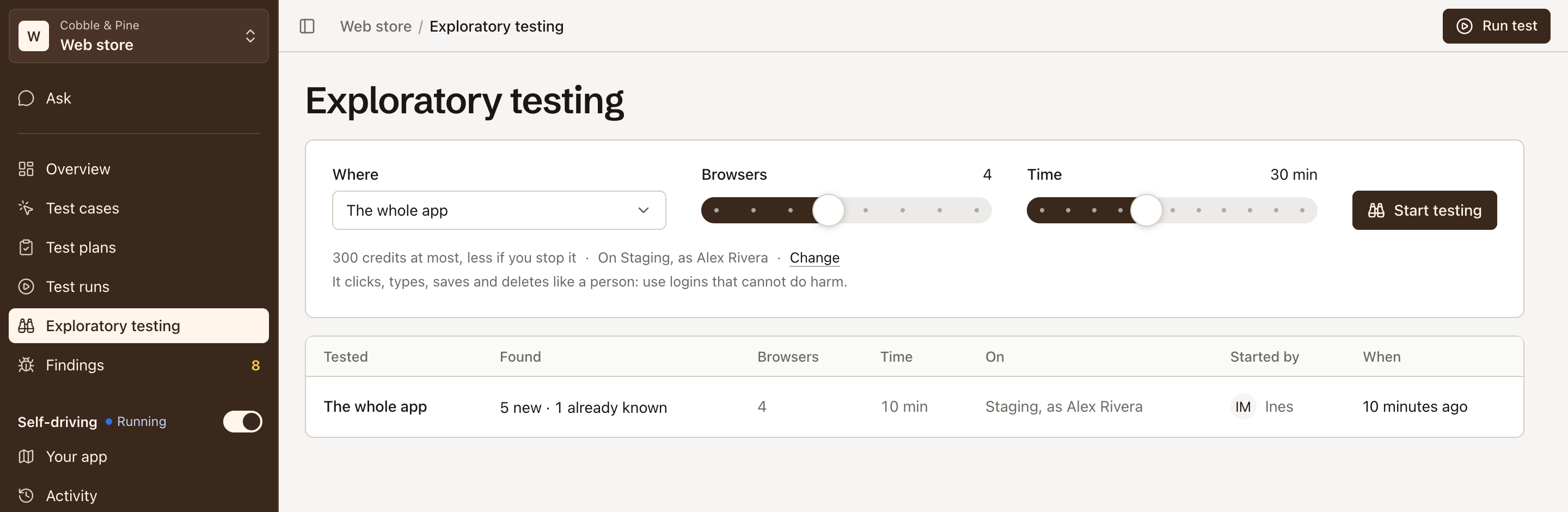
Section titled “Start a session”The top of the page is the start. Its standard settings need no choice: the whole app, four browsers, 30 minutes, on the environment and with the login Self-driving uses (else on the project’s default environment, signed out).
-
Under Where, keep The whole app, or pick an area: the areas of Your app, each by the word in its address, and its critical and high journeys. Typing narrows the list, or names a place of your own, such as
checkout with a coupon. -
Under Browsers, choose from 1 to 8.
-
Under Time, choose from 10 to 60 minutes, in steps of 5.
-
Check the line under the choices: what the session costs at most, and where it runs and as whom, such as “On Staging, signed out”. Change sets the environment and the logins.
-
Click Start testing.
The session waits for browsers, then starts. A project runs one session at a time.
Where it runs, and as whom
Section titled “Where it runs, and as whom”Under Change, choose the Environment, and under Signed in as the login every browser signs in with, or None: it stays signed out. Another login, to check what each may see adds a second and a third login: a tester checking roles opens one of them in a browser of its own, to see whether one account can reach what another can’t. A login scoped to an environment signs in only there.
What it costs
Section titled “What it costs”A session is priced per minute, by its browsers:
| Browsers | 1 | 2 | 3 | 4 (standard) | 5 | 6 | 7 | 8 |
|---|---|---|---|---|---|---|---|---|
| Credits a minute | 4 | 4 | 7 | 10 | 14 | 17 | 20 | 24 |
So 30 minutes with four browsers costs at most 300 credits, and 60 minutes with eight at most 1,440. The start says the most it costs; it is charged when it ends, for every minute it started once its testers ran, so a session you stop early costs less. A session that got fewer browsers than it asked for pays for those it had. One that couldn’t start, or failed on a refused login or on Testmode’s side, costs nothing.
A session starts only when your organization’s credits cover its whole time box, beyond what its other sessions under way may still use. When they don’t, the start says how many it needs and how many are left. See How credits are counted.
Its browsers
Section titled “Its browsers”With two browsers or more, every browser but one is a tester: an AI agent working on one kind of test at a time, such as forms, lists, saving, a record’s life from creation to deletion, the same lists in other places, two tabs at once, narrow and wide windows, wording, or (with two logins) roles. Each takes a new kind of test every few minutes, and no two testers hold the same one.
The last browser runs the checker, shown as Links and filters: a program, with no AI, that reads every page the testers open and checks what must hold on any app: a list’s filters, tabs and search work together, sorting keeps the records, a record is on one page of a list, a link opens a page.
One browser alone is a tester that takes the kinds of test in turn.
A tester reports a bug only once it has seen it twice, the second time from a fresh start. Each report is compared with what the session already reported, so a bug is reported once.
Follow it as it runs
Section titled “Follow it as it runs”While a session runs, the start is replaced by the session: its state as the title, such as Testing Checkout, a window for each browser with the screen it is on and the kind of test it is doing, its minutes, and what it found so far. The windows show the map’s picture of each screen, not a live picture of the browser. Before its browsers start, the windows are empty frames that say Opening….
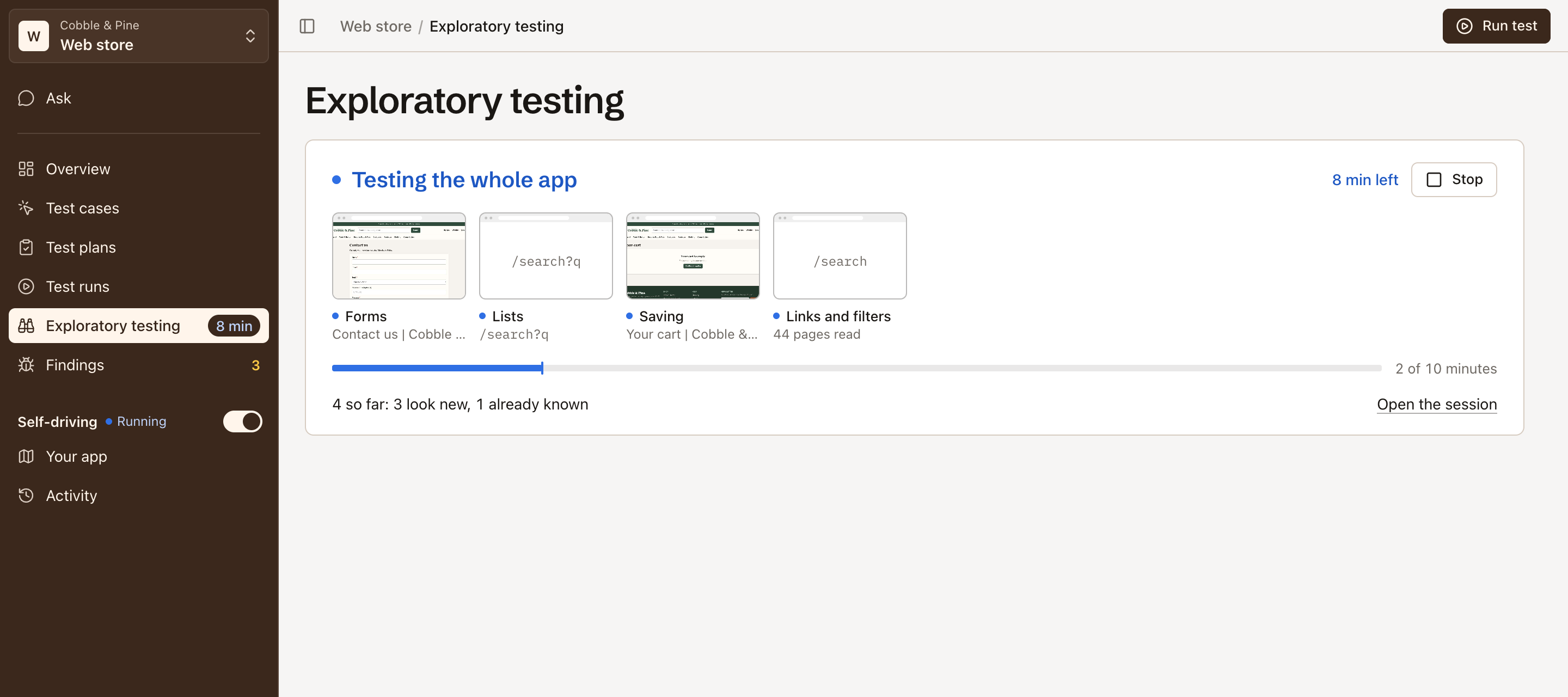
Open the session opens its page, which adds a lane for each browser: the stretches of time it spent on each kind of test, with a dot where it saw a bug (filled for a new bug or one that came back, hollow for one you already have). Under So far, the bugs it reported are listed as they come in; they are filed when it ends.
Stop a session
Section titled “Stop a session”Stop ends it early. A session still waiting for browsers ends at once and costs nothing; a running one stops, files what it saw and pays for the minutes it ran. A session can also end before its time when its testers have nothing left to try.
When a session ends, whoever started it is told, on whatever page of the app they are.
What it found
Section titled “What it found”A finished session’s page says what it found in its title, such as “3 new bugs in Checkout”, “Nothing new in Checkout” (only bugs you already had), “No bugs in Checkout” or “Stopped testing Checkout”, with a line under it on what it tried and reported, and its facts: who started it, where and as whom, its browsers, when it ended and what it cost.
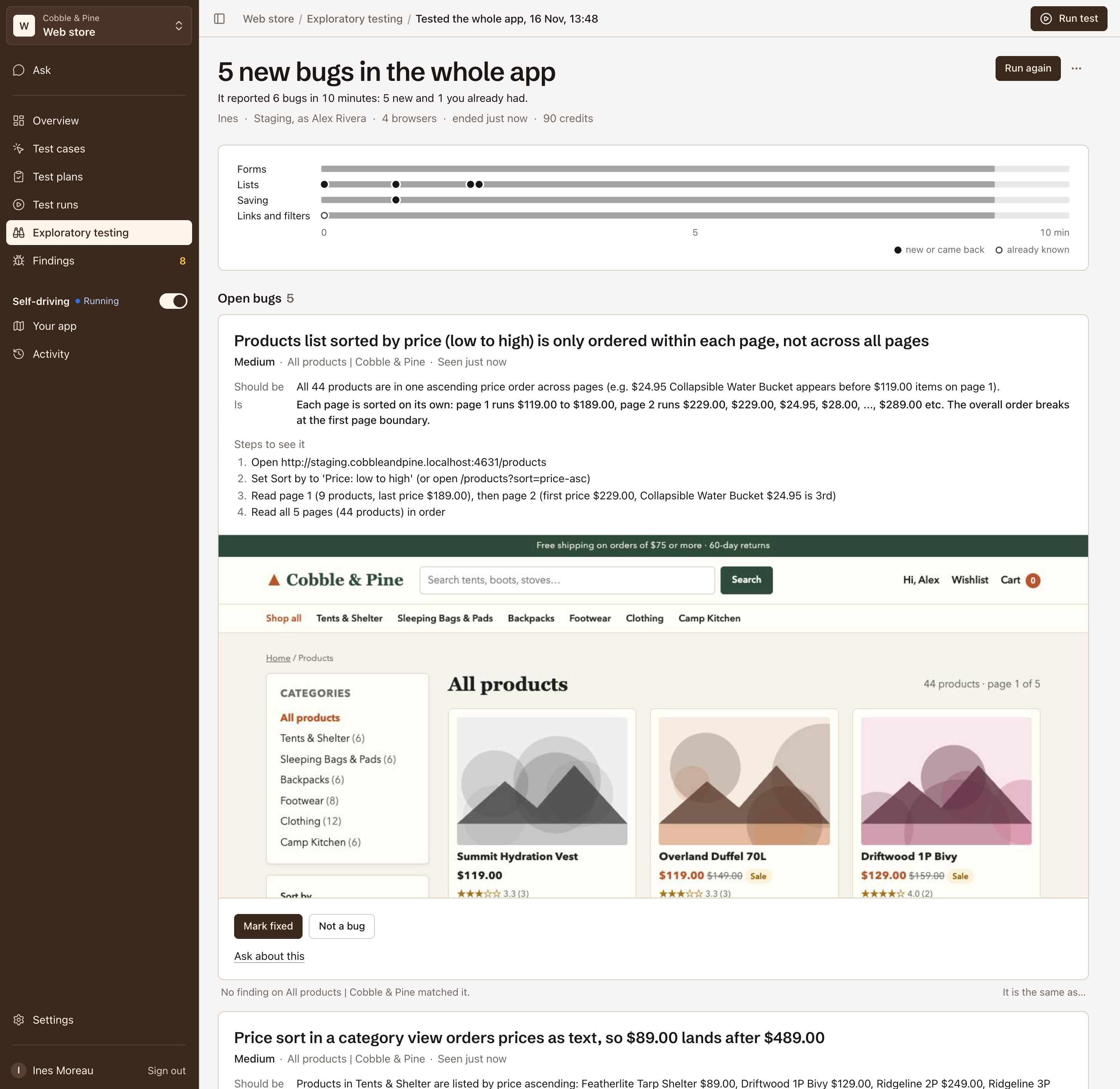
Below the lanes:
- Open bugs: each bug it filed, as its card from Findings, with Mark fixed and Not a bug.
- Decided: bugs that have been answered since, and how.
- Already known: bugs you already had. Each was counted on the finding it matched; nothing was filed.
- What it tried: how much it tried on how many pages, each stretch of its time and the pages it was on.
Run again opens the start with the same area, browsers, time, environment and logins filled in. In its ⋯ menu, Copy as a command copies the API call that starts the same session.
Under the start, the sessions that are over are listed with what each tested, what it found, its browsers and time, where it ran, who started it and when.
Into Findings
Section titled “Into Findings”When a session ends, each bug it reported is filed without duplicates:
- New: a new finding in Findings, which stands like any bug.
- Came back: a bug that was fixed opens again.
- Already known: counted on the open finding it matched, as one more sighting.
A bug’s card in Findings links to the session that found it, or saw it again.
Correct a match
Section titled “Correct a match”Before it files, a session compares each bug with the project’s findings. When it got one wrong, correct it on the session’s page (the Editor role or above):
- Not the same bug files a bug it counted on another finding as a new one.
- It is the same as… counts a bug it filed as new on the finding it really is.
Each correction can be undone, and later sessions read it, so they don’t make the same mistake.
From the API and MCP
Section titled “From the API and MCP”A session can be started with a project API key, for example after a deploy:
curl -X POST https://api.testmode.ai/v1/sessions \ -H "Authorization: Bearer $TESTMODE_API_KEY" \ -H "Content-Type: application/json" \ -d '{"environment": "Staging", "area": "checkout", "minutes": 30}'- environment: its name or id; the project’s default environment when left out.
- logins: up to 3 login names or ids; signed out when left out.
- area: where to test; the whole app when left out.
- brief: what to concentrate on, in your own words.
- minutes: 10 to 60; 30 when left out.
- browsers: 1 to 8; the standard four when left out.
GET /v1/sessions lists recent sessions, GET /v1/sessions/{id} returns one with every bug it reported (poll it until finished is true), and POST /v1/sessions/{id}/stop stops one. On Free the API answers 402 with plan_required, and with too few credits 402 with insufficient_credits. While testing is paused, sessions started from the API are refused; one a person starts still runs.
AI agents start and read sessions over MCP with start_exploratory_session and get_exploratory_session. See REST API and Connect an AI agent over MCP.
Common questions
Section titled “Common questions”What does a session cost?
Section titled “What does a session cost?”It is priced per minute by its browsers: 10 credits a minute with the standard four browsers, from 4 a minute with one or two to 24 with eight. It is charged when it ends, for the minutes it ran. A 30-minute session with four browsers costs at most 300 credits.
Does a session change data in my app?
Section titled “Does a session change data in my app?”It can. Its testers click, type, save and delete like a person, with the rights of the logins you give it. Give it logins that can do no harm, or run it on staging. Its browsers never leave your site.
Can two sessions run at once?
Section titled “Can two sessions run at once?”Not in one project: a project runs one session at a time. Sessions of different projects can run at the same time, each paid for by the organization’s credits.