How credits work
Testmode runs are paid for with your organization’s credits. A run costs one credit for each step written in the test cases it runs, with at least one credit per test case. Testmode reserves the full cost when the run starts, and gives credits back for any test that ends before the agent takes its first action.
Credits belong to the organization
Section titled “Credits belong to the organization”- One balance for everyone. Every project and every member of the organization draws on the same credits. Whoever starts a run, the credits come from the organization.
- Everyone can see it. The balance shows under the organization’s name at the bottom of the sidebar, as “N credits”. It turns amber when the balance runs low.
- Owners and Admins buy credits. They also see the balance in detail and the history of every credit on the Billing tab. See Buy credits and read billing history.
Starting a run, and so spending credits, needs the Editor role or above.
What a run costs
Section titled “What a run costs”A run costs one credit per step in each test case it runs, with a minimum of one credit per test case. The run’s cost is the sum over the test cases it actually runs: the enabled ones with steps or an Expected Outcome.
Here is what a run of Pellbrook Digital’s Storefront smoke plan costs:
| Test case | Steps | Credits |
|---|---|---|
| Search finds hammers | 2 | 2 |
| Filter catalogue by the Hammer category | 2 | 2 |
| Product page shows price and Add to cart | 2 | 2 |
| Add a product to the cart | 4 | 4 |
| Login rejects an unknown email | 2 | 2 |
| The whole run | 12 |
Good to know:
- Testmode counts the steps you wrote, not the browser actions. One step can take the agent several clicks and keystrokes. It still costs one credit.
- Disabled test cases cost nothing. They are left out of the run.
- Test cases with no steps and no Expected Outcome are skipped and cost nothing. The Run tests dialog marks them and leaves them out of its estimate. See Run tests.
- You see the cost before you start. The Run tests dialog shows “One credit per test step” until you choose what to run, then “Uses N credits · M available”. Testmode confirms the cost when it creates the run.
- Re-run costs the same way. Re-run on the Runs page starts a new run and uses credits, but it does not show the cost first.
- Plans and prices are on the Pricing page. The test-run counts there are estimates, because the credits a run uses depend on how many steps its tests have.
When credits are reserved
Section titled “When credits are reserved”Testmode reserves the whole cost of a run at the moment it creates the run, before any test starts. The credits leave the balance straight away.
- All or nothing. If the balance is smaller than the cost, no run is created. There are no partial runs.
- The cost is fixed at the start. Editing a test case’s steps after the run has started does not change what that run costs.
- A test stays charged once the agent has acted. When the agent recorded at least one action, the test keeps its credits, whether it passed, failed, ran out of time or hit an error. Finding what broke is what the run is for.
- A verdict without actions counts too. When the agent reaches its verdict just by looking at the page, Testmode records an “Observed the page” step and the test keeps its credits.
- A run cannot be stopped once it starts. Its credits are spent, apart from those returned as described in the next section. See Run tests.
Credits returned for tests that never ran
Section titled “Credits returned for tests that never ran”Testmode gives a test’s credits back when the agent never took an action in it. That happens when:
- its test case was deleted before the test started
- its environment was deleted before the test started
- it had nothing left to check when it started, for example because its steps were blank once variables were filled in. It fails with “This test has no steps or expected outcome to check. Add at least one step.”
- automatic login failed before the test started (“Login failed: …”)
- it hit an error or ran out of time before the agent took its first action
- it never started, even after Testmode tried several times
The History on the Billing tab then shows “Refund (test did not run)”, linked to the run. The test itself still shows Failed on the run page, with the reason, and its Test Steps read “No Steps Recorded”. See Troubleshoot login when the reason is a login failure.
When there are not enough credits
Section titled “When there are not enough credits”Runs you start. When the cost is higher than the balance, the footer of the Run tests dialog turns amber and Run is disabled. Owners and Admins see a Buy credits link that opens Billing. Everyone else sees “ask an organization admin to buy credits”.
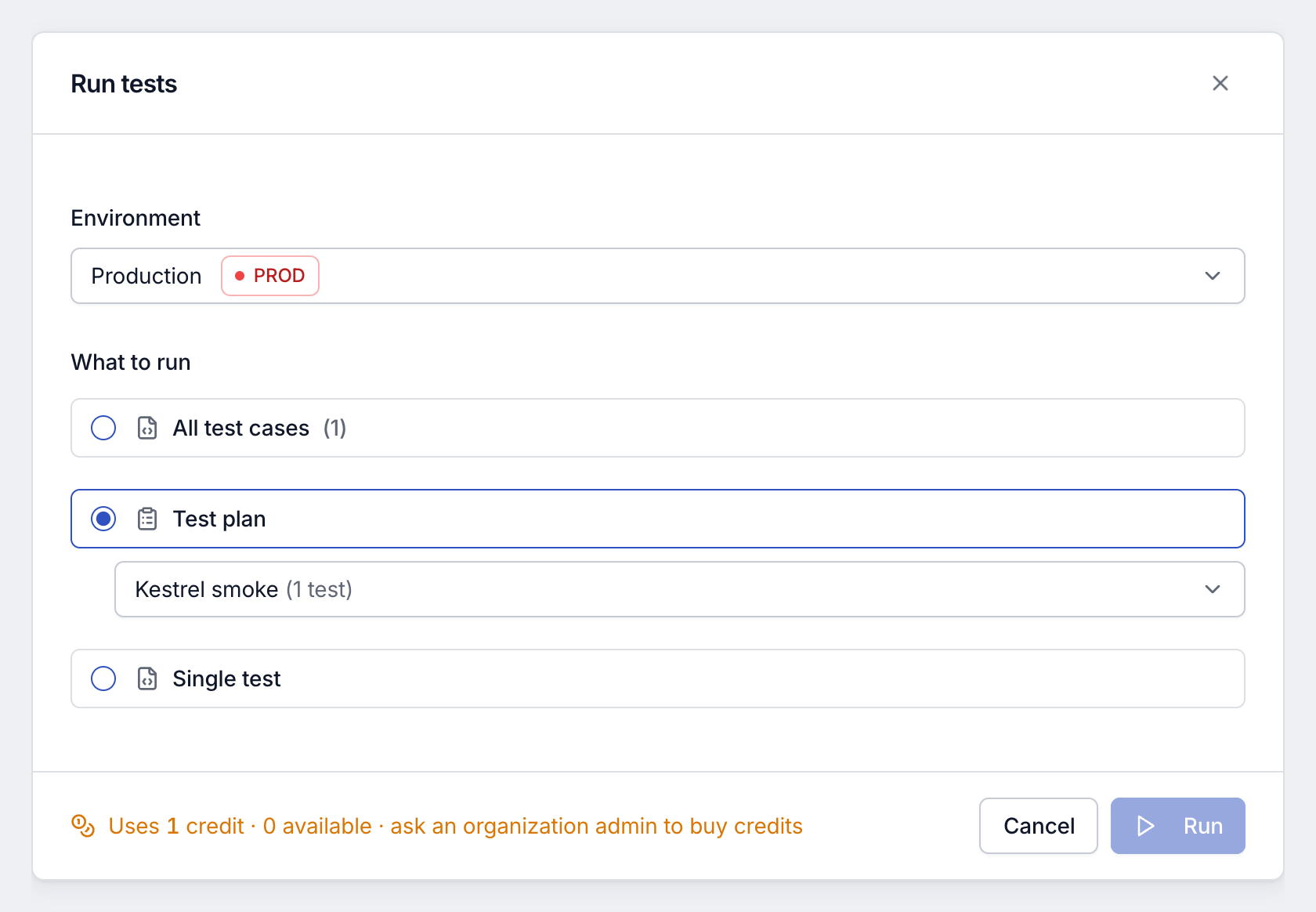
If the balance drops after you opened the dialog, Testmode refuses the run when you click Run and shows “Not enough credits”, with how many credits the run needs and how many the organization has.
Scheduled runs. When a schedule fires without enough credits, no tests run. Testmode records a run with status Skipped and the reason “Insufficient credits: this run needs X credits but the organization has Y.” A scheduled run is also skipped, at no cost, when none of its test cases has steps or an Expected Outcome.
- A skipped run is not charged, and it sends no email report.
- Its page shows “This run was skipped” with a Manage credits link.
- The next scheduled time tries again. Skipped runs are not retried.
See Schedule test plans.
Explorations. Starting an exploration needs a credit balance above zero. With no credits left, Testmode refuses with “Your organization has no credits left. Buy credits to start an exploration.” See Start an exploration.
Expiry
Section titled “Expiry”Credits are added in batches, and every batch has an expiry date. Before you buy, a credit pack can show how long its credits stay valid, such as “Valid for N days”.
- Soonest first. Testmode spends credits from the batch that expires soonest.
- Expired credits stop counting at once. Unused credits leave the balance when their batch expires, and the History later shows “Credits expired”.
- Next expiry on the Billing tab shows how many credits expire next, and when.
Where to see your balance
Section titled “Where to see your balance”| Where | Who sees it | What it shows |
|---|---|---|
| The organization button at the bottom of the sidebar | Every member | The balance, in amber when it runs low. |
| The footer of the Run tests dialog | Editors and above, when starting a run | What the run will use and what is available. |
| Billing & credits in the organization menu | Owners and Admins | The balance, Next expiry, Used in the last 30 days and the full History. |
When the balance runs low, the Billing tab reads “Running low. Buy credits to keep tests running.” At zero it reads “No credits left. Test runs are paused until you buy more.”
Related
Section titled “Related” testmode
Better software quality. No manual testing. Your team knows the software. Testmode does the testing.